Cooling is now a practical design and sourcing concern for global computer buyers. The International Energy Agency’s 2025 Energy and AI report estimates that data centres used about 415 terawatt-hours of electricity in 2024, or roughly 1.5% of global electricity demand. The IEA projects consumption could reach about 945 terawatt-hours by 2030. These figures describe data centres, not PC fans alone, but they underline the wider need for effective thermal management.
A Pc Cooling Fan must move air reliably without adding unacceptable noise, power draw, or vibration. Buyers should compare airflow and static pressure alongside fan size, bearing type, operating voltage, PWM control, connector, and rated lifespan. Small details matter. A fan may fit a case yet perform poorly against a dense heatsink or restricted front panel. Published specifications help narrow choices; sample testing under the intended system load helps verify them.
This guide introduces China-based manufacturers serving international buyers and outlines practical ways to assess their products and capabilities. It focuses on evidence buyers can check, including datasheets, quality procedures, customization options, sample consistency, and communication during development. No single specification tells the whole story. A catalogue can look convincing, while sustained testing may reveal trade-offs in noise or airflow. Treat manufacturer claims as a starting point, then confirm performance against your own requirements.
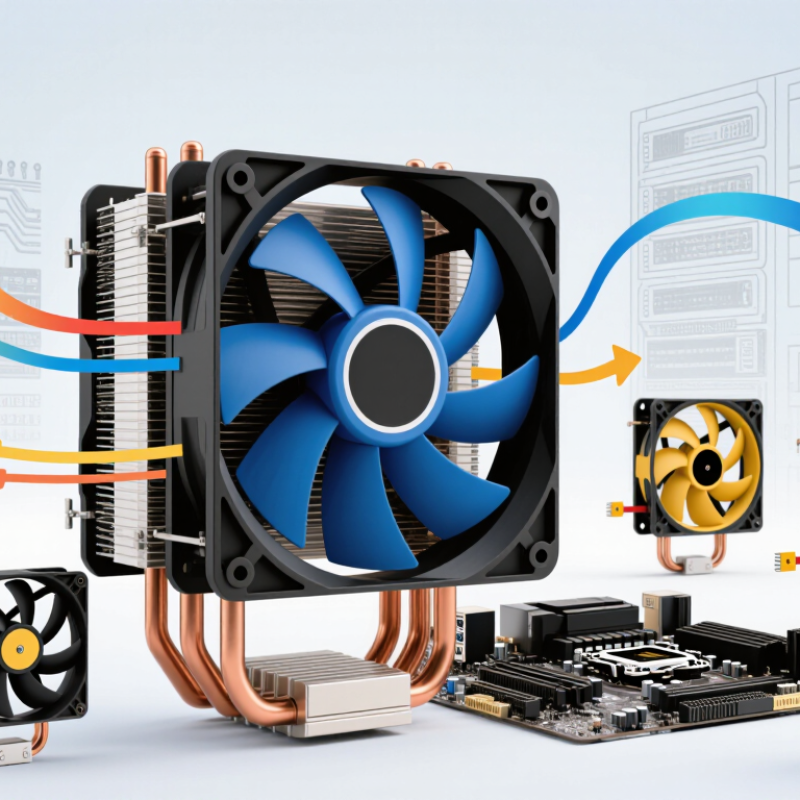
A PC cooling fan is a small air-moving component that helps carry heat away from processors, graphics cards, and other parts. It does not create cooling by itself. It guides air across a heatsink or radiator, then helps move warm air out of the case. Small details matter. Dust-clogged filters, tight cable bundles, and poorly placed fans can disrupt airflow.
Fans are commonly classified by airflow design, frame size, control method, and bearing type. Axial fans move air along the motor shaft and are widely used in cases and radiators. Centrifugal blowers draw air in through the center and push it outward, which can suit narrow spaces. A 120 mm or 140 mm frame describes its dimensions, not its cooling performance. Three-pin fans typically use voltage control, while four-pin models can use PWM speed control. Bearing choices also affect noise, service life, and cost.
The Lawrence Berkeley National Laboratory’s 2024 United States Data Center Energy Usage Report estimates that U.S. data centers used 176 TWh of electricity in 2023, about 4.4% of national use. That figure concerns data centers, not desktop PCs, but it shows why efficient thermal management matters. Fan labels alone do not tell the whole story. This classification is useful, yet imperfect: filters, case shape, and fan placement can change real airflow. A quiet fan may also move too little air for a dense heatsink.

For global buyers, a cooling fan’s headline airflow rating is only part of the picture. Check airflow in cubic feet per minute and static pressure in pascals, especially when the fan must push air through a dense filter or radiator. A high free-air rating may not predict performance inside a restricted enclosure. Small details matter.
Compare noise levels in dBA, but ask how and where they were measured. A reading taken at one meter may not match the sound inside a metal cabinet. Review the fan curve across operating speeds, not just its maximum RPM. PWM control can help balance cooling and noise as workloads change. Confirm frame dimensions, mounting-hole spacing, connector type, and rated voltage before ordering samples.
Reliability deserves equal attention. Ask about bearing type, rated operating life, temperature range, and the conditions behind those figures. Request test reports or sample units, then check vibration, startup behavior, and noise in your own assembly. Results can differ from laboratory conditions. That is worth admitting. Also verify packaging and production tolerances across batches; even a small frame mismatch can complicate installation. A clear specification sheet helps, but measurements under real operating conditions are more useful for selecting a fan that fits the system.
| Specification | Common Options or Typical Values | What Global Buyers Should Check |
|---|---|---|
| Frame size | Common nominal sizes include 80, 92, 120, 140, and 200 mm. | Confirm the mounting-hole spacing and case or heatsink compatibility; nominal fan size alone does not confirm fit. |
| Fan thickness | 25 mm is common for case fans; slim and thicker designs are also available. | Check clearance around radiators, memory, side panels, and other components. |
| Rated voltage | 12 V DC is standard for many desktop PC fans; 5 V models are used in some USB-powered applications. | Match the fan voltage to the intended power source and verify the operating-voltage range in the datasheet. |
| Connector and control | 3-pin connectors commonly support voltage-based speed control; 4-pin connectors support PWM control. | Confirm connector pinout, cable length, tachometer signal availability, and motherboard or controller compatibility. |
| Rotational speed | Varies by model; PC fan datasheets typically state a rated RPM and a tolerance. | Request rated speed, tolerance, minimum stable speed, and the speed-control range rather than comparing maximum RPM alone. |
| Airflow | Usually reported in CFM or m³/h; the value depends on fan size, speed, and blade design. | Compare results measured using the same test method. Free-air airflow does not represent performance against system resistance. |
| Static pressure | Usually reported in mmH₂O or Pa; higher-pressure designs are often selected for radiators, heatsinks, and restrictive filters. | Ask for the pressure-flow curve when available; a maximum static-pressure figure alone does not describe airflow at a particular restriction. |
| Noise level | Commonly specified in dB(A); results vary with speed, distance, room acoustics, and measurement method. | Request the test distance and method, and compare noise at equivalent operating speeds. |
| Bearing type | Common types include sleeve, ball, and fluid-dynamic or hydrodynamic bearings. | Request operating-life data and the conditions used for the rating; bearing type alone does not guarantee service life or noise performance. |
| Power and current | Rated current and power consumption are model-specific and should be listed on the datasheet. | Check startup current and the total load when multiple fans share a motherboard header or controller. |
| Environmental and compliance data | Operating temperature, ingress protection, and regulatory documentation vary by product and intended use. | Specify destination-market requirements and request applicable test reports and compliance documents for the exact model. |
When assessing Chinese PC cooling fan manufacturers, begin with operating conditions, not catalog headlines. A fan rated at 2,000 RPM may still struggle against a dense radiator. Request airflow and static-pressure curves, along with the test setup behind them. Ask whether noise readings were taken in a quiet room at a stated distance. Small details matter. Compare samples at identical voltage and mounting positions; otherwise, results can mislead. Check frame dimensions, connector pinout, PWM response, cable length, and bearing type. Confirm that quoted tolerances match the production drawing, not only a sample.
Look for evidence of a repeatable process. Request inspection records for start-up voltage, speed, vibration, and noise, and ask how failed units are handled. A factory visit or video walkthrough can reveal assembly flow, calibration tools, and carton protection, but neither guarantees lasting quality. Request a pilot batch before placing a larger order. Compare batch units with approved samples, checking blade finish, label placement, and screw fit. Clarify lead times, spare-part availability, and who handles corrective actions when specifications are missed. Be cautious of polished spreadsheets without dates or test conditions. Ask again. No checklist catches every mismatch, and that limitation deserves honest attention.
For global buyers comparing China PC cooling fan manufacturers, production capability matters beyond advertised capacity. A reliable factory should explain how motor assembly, blade balancing, and frame molding are controlled. Ask to see a process flow, not just polished product photos. Details such as bearing type, rated voltage, airflow, and operating noise should match the sample and datasheet. Small differences matter.
Quality control works best when checks happen at several stages. Incoming materials can be checked for dimensions and insulation; assembled fans can be tested for startup, current draw, vibration, and sound. A useful report identifies the test method, sample size, and acceptance limits. Buyers should also confirm how defects are recorded and corrected. A pass mark alone tells little. Test consistently.
Customization may cover fan size, connector, cable length, speed control, labels, packaging, or a tailored airflow-noise balance. Clear drawings and written specifications reduce costly misunderstandings. Request a pre-production sample, then compare it under the same voltage and test setup used for approval. Not every adjustment is practical. A thinner frame, for example, may affect rigidity or acoustic performance. Factory documents can still miss details, so independent checks and direct technical questions remain sensible.
International sourcing starts with a precise specification, not a low unit price. For each PC cooling fan, record voltage, airflow, static pressure, noise, connector type, and bearing-life claims. Request test reports, material declarations, and lot-level traceability before approving production. Confirm which destination-market requirements apply; a certificate from one market may not satisfy another. Ask who handles labeling and documentation, then have a qualified customs broker verify product classification. Small paperwork gaps can delay a shipment.
Logistics deserves the same scrutiny. The World Bank’s 2023 Logistics Performance Index assessed 139 economies, measuring areas such as customs, infrastructure, and shipment timeliness. OECD analysis estimates that comprehensive trade-facilitation reforms can reduce trade costs by up to 14.3%. For buyers, that makes clear shipping terms and realistic lead-time buffers more than administrative details. Compare air and ocean options against inventory needs, and check packaging with a physical sample: thin fan blades and exposed connectors can be damaged in transit. A polished sample can mislead. Pilot orders reveal production variation, but they do not guarantee every later batch will match. Include inspection criteria and a process for handling nonconforming units in the purchase agreement.