Why Choose the Right Computer Cases for Your Business Needs?
When setting up a business, selecting the right Computer Cases is crucial. The case serves as the guardians of your computer equipment and ensures optimal performance. Investing in quality cases can prevent costly damage to your machines.
Well-constructed Computer Cases provide necessary protection against dust and overheating. They also offer adequate space for ventilation, which directly impacts performance. Without proper airflow, hardware can underperform or fail. A case that is too cramped can lead to frustrating problems down the line.
However, not all Computer Cases are created equal. Some may look good but fail in functionality. It’s essential to evaluate your specific needs. Consider factors like size, design, and cooling options. Doing so can save money and stress in the long run. Choosing wisely can make a significant difference in your business operations.
Choosing Computer Cases: Key Factors for Business Operations
When selecting computer cases, several factors are essential for effective business operations. The right case safeguards your hardware and ensures optimal performance. Consider airflow and cooling. Overheating can damage components and lead to costly downtime. A well-ventilated case can significantly enhance system stability.
Size matters, too. Assess your current hardware and future upgrades. A compact case might be tempting, but it can limit your expansion options. Ensure ample space for cooling components and storage devices. The design should facilitate easy access for maintenance. Neglected hardware can result in inefficiency.
Durability is crucial in a busy business environment. A robust case protects against physical damage. Look for materials that withstand wear and tear. Sometimes, the aesthetic appeal of a case distracts from functionality. Focus on practical features that enhance usability. Don’t be swayed by flashy designs; prioritize your operational needs instead.
Impact of Computer Case Design on Cooling Efficiency and Longevity
Choosing the right computer case is crucial for any business relying on technology. The design of a computer case affects cooling efficiency directly. When components overheat, they wear out quickly. A well-ventilated case facilitates airflow, reducing the risk of overheating. Airflow is essential for maintaining optimal temperatures.
Different designs cater to different needs. Some cases have built-in fans, while others require additional installation. A case without proper airflow can lead to performance issues. Over time, heat can damage critical components, leading to unexpected failures. Understanding this correlation is vital for long-term durability.
Not all features guarantee superior cooling. Some cases may appear stylish but lack functionality. Relying solely on aesthetics can be misleading. Businesses should prioritize practicality over appearance. Testing various setups can help find the best solution. A case may look good but fail in performance. Making informed choices will enhance efficiency and longevity.
Impact of Computer Case Design on Cooling Efficiency
Material Considerations: Durability and Weight in Computer Cases
When selecting computer cases for business, material considerations are crucial. The choice of materials can impact both durability and weight. For businesses that require portability, lighter materials like aluminum or high-density plastic provide advantages. These materials can make transportation easier and reduce fatigue during handling.
However, lighter does not always mean more durable. Some lightweight cases may lack the robustness needed for heavy-use environments. Businesses should assess their unique needs carefully. If equipment will be moved frequently, finding the right balance between weight and durability is essential. Employees need to feel confident that their technology is protected.
On the other hand, heavier materials like steel offer superior protection. Steel cases can withstand impacts and are less likely to bend or dent. But their weight could be a drawback for constant relocation. Businesses might grapple with the trade-offs between protection and ease of transport. Reflecting on these factors leads to better decision-making in case selection.
Cost Analysis: Balancing Price and Functionality in Computer Cases
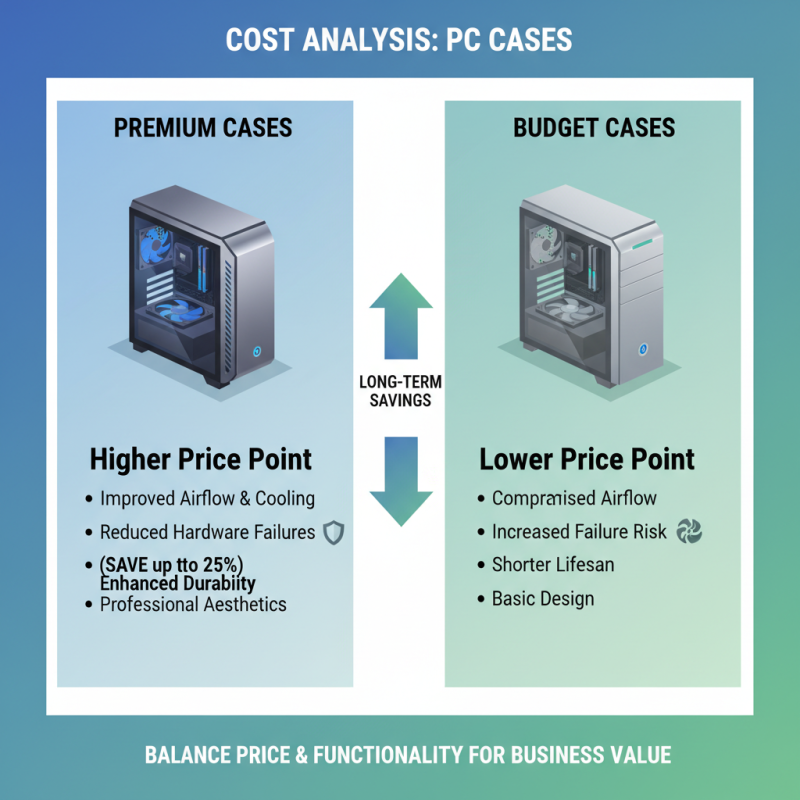
When selecting computer cases for your business, a thorough cost analysis is essential. Quality computer cases come in various price ranges, affecting overall performance and aesthetics. According to a recent industry report, businesses can save up to 25% on hardware failures by investing in high-quality cases. Cheaper options may seem appealing, but they often compromise airflow and cooling efficiency.
Balancing price and functionality is key. Some mid-range cases provide excellent performance without breaking the bank. For instance, a sturdy case with proper ventilation can reduce thermal throttling, ensuring optimal performance. Consequently, this prevents overheating and prolongs the lifespan of internal components. A case's material also matters; metal cases, while more expensive, are typically more durable than plastic ones.
**Tips:**
Consider investing in cases that offer modular designs. This flexibility allows easy upgrades without needing to replace the entire setup. Additionally, keep an eye on user reviews and expert recommendations to gauge the long-term reliability of a case. Emerging companies can make mistakes in overlooking these factors, risking higher future costs. Always weigh initial investment against potential long-term savings. Making thoughtful choices in computer cases equips your business for success.
Case Sizes and Compatibility: Ensuring Optimal Component Fit for Performance
When selecting computer cases, size and compatibility significantly influence performance. A well-fitted case ensures that all components, from the motherboard to the cooling systems, function optimally. According to a report by IDC, approximately 37% of users experience overheating due to ill-fitting components. This can lead to reduced performance and increased downtime, a risk that businesses cannot afford.
Case dimensions such as ATX, Micro-ATX, and Mini-ITX dictate the arrangement of hardware components. A report by Gartner indicates 54% of IT managers report issues related to incompatible hardware. The right case not only addresses size but also airflow management, reducing thermal stress. Cooling systems require adequate space—both in size and airflow path. Without it, even top-notch components underperform.
Many overlook the importance of planning for future upgrades. Choosing a slightly larger case can save money and time later. It's common to misjudge space requirements or ignore cooling solutions, leading to inefficiencies. Over 40% of organizations have faced operational setbacks due to upgrading hardware that doesn’t fit correctly. Ignoring these factors can result in significant long-term costs.
Why Choose the Right Computer Cases for Your Business Needs? - Case Sizes and Compatibility: Ensuring Optimal Component Fit for Performance
| Case Model |
Form Factor |
Max GPU Length (mm) |
Cooling Options |
Drive Bays |
Dimensions (L x W x H mm) |
| Model A |
ATX |
400 |
Air, Liquid |
3 x 2.5", 2 x 3.5" |
450 x 210 x 470 |
| Model B |
Micro ATX |
350 |
Air |
2 x 2.5", 1 x 3.5" |
380 x 180 x 400 |
| Model C |
Mini ITX |
250 |
Air |
1 x 2.5" |
350 x 200 x 250 |
| Model D |
ATX |
450 |
Liquid |
4 x 2.5", 3 x 3.5" |
460 x 230 x 500 |