How to Choose the Best CPU Cooler in 2026
Choosing a Cpu Cooler in 2026 is less about buying the largest heatsink and more about matching cooling performance to your processor, case, and daily workload. A compact air cooler may suit a quiet office build. A demanding processor used for long renders may need a larger tower or a well-sized liquid cooler. Even then, specifications alone can mislead. Case airflow, room temperature, fan curves, and installation pressure all affect the result.
Gamers Nexus founder Steve Burke is known for detailed, controlled hardware testing. His work points to a useful principle: compare cooler results under consistent conditions, including noise and temperature. That matters because a cooler that looks impressive in one test may behave differently inside a cramped case. Listen for fan tone, too. A low hum can be easier to live with than a sharp whine, even when temperatures look similar.
This guide will examine cooler types, socket compatibility, clearance, noise, price, and real-world performance. It will also explain when an air cooler is enough and when liquid cooling makes sense. There is no universal winner. Some comparisons remain imperfect, since test benches and workloads differ. Keep that limitation in view. A sensible choice should fit your build today, leave room for future upgrades, and stay dependable through ordinary use—not just a short benchmark run.
Understand CPU Cooler Types and Their Core Designs
CPU coolers move heat away from the processor, but their designs take different paths. Air coolers use a metal base, heat pipes, and fin stacks. Heat pipes carry warmth into the fins, where a fan pushes it into the case. Tower models usually direct airflow toward the rear exhaust. Low-profile, top-down models blow across the motherboard instead, which can help cool nearby components. Air is simpler. But a large tower can crowd memory slots or block a side panel.
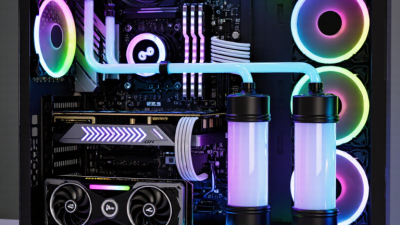
Liquid coolers transfer heat through a cold plate and circulating coolant to a radiator. Fans then move heat from the radiator into the case air. A larger radiator offers more surface area, but it also needs mounting space and a clear airflow path. The pump adds another moving part, so placement and cable routing deserve attention. A tidy-looking installation is not automatically a quiet one.
When comparing designs, check the socket mounting system, cooler height, radiator fit, and case airflow before focusing on advertised cooling capacity. These details are easy to overlook. A powerful cooler can perform poorly if warm air keeps recirculating inside the case. Fan size, fin density, and heat-pipe layout also affect noise and heat transfer. It is tempting to treat one design as universally best; real systems are less neat than that. The right choice depends on the processor’s heat output, available space, and how much fan noise you can tolerate.
How to Choose the Best CPU Cooler in 2026
Understand CPU cooler types and their core designs
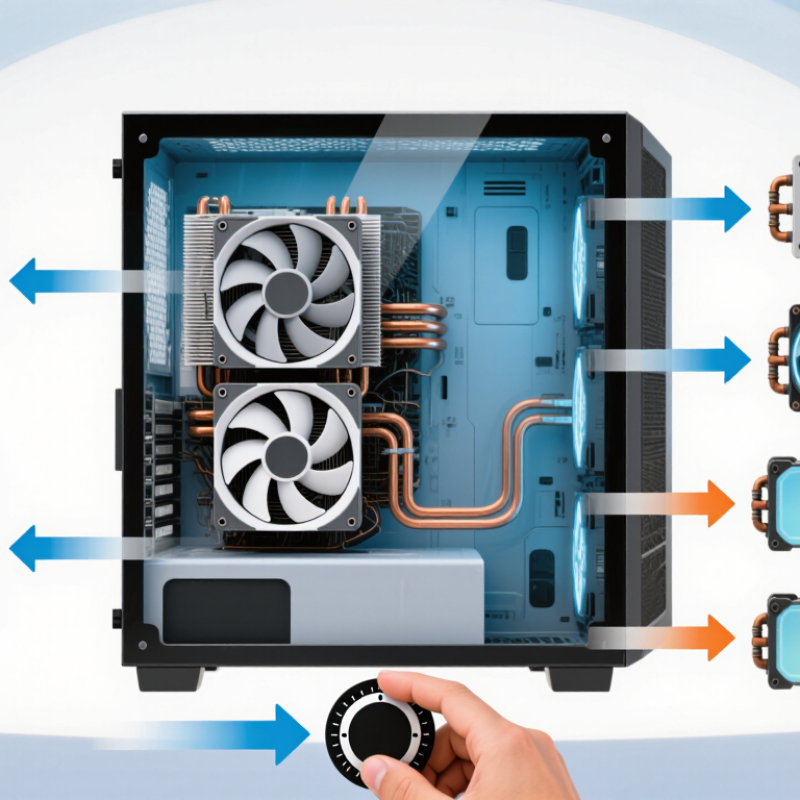
Typical fan positions vary by model. Tower air coolers use heatsink towers and fans; AIO liquid coolers circulate coolant through a radiator. Fan count alone does not determine cooling performance—also consider CPU power, cooler clearance, noise, and case airflow.
Determine Your Processor’s Cooling Needs
Determine your processor’s cooling needs by checking its official power limits and the kind of work it will handle. A processor gaming in short bursts may need less cooling than one rendering video for hours. Don’t rely on a single thermal-design figure; actual power use can rise during sustained boost. Look for measurements from tests of the exact processor, especially temperatures and power draw under workloads similar to yours. That matters.
Next, consider your room and case. A warm room, restricted front vents, or a graphics card that heats the case can push processor temperatures higher. Check the cooler’s height or radiator fit against your case dimensions before buying. Leave room. If quiet operation matters, allow extra cooling capacity so fans do not need to spin loudly during routine tasks. A modest workload does not always mean a small cooler is enough.
After installation, check temperatures during a long workload, not just at the desktop. Watch for thermal throttling, sudden fan noise, and temperatures that keep climbing. Compare results with the processor’s published limits. No estimate is perfect. Even careful planning can miss poor case airflow or an uneven cooler mount, so treat the first test as a chance to reassess.
How to Choose the Best CPU Cooler in 2026 - Determine Your Processor’s Cooling Needs
| Sustained CPU Package Power |
Typical Workload |
Cooler Class to Consider |
Practical Selection Notes |
| Up to about 65 W |
Office work, web browsing, light gaming |
Stock cooler, compact tower, or low-profile cooler |
Check socket compatibility and case clearance. A larger heatsink can reduce fan noise, even when a basic cooler can handle the load. |
| About 65–120 W |
General gaming, streaming, everyday creation |
Single-tower air cooler with a suitable heatsink and fan |
A common balance of cost, noise, and cooling capacity. Confirm that the cooler does not interfere with memory modules or the case side panel. |
| About 120–200 W |
Long gaming sessions, rendering, compiling, heavy multitasking |
Large dual-tower air cooler or 240 mm liquid cooler |
Prioritize strong case airflow and low-noise performance. For liquid cooling, verify radiator thickness, mounting position, and tubing clearance. |
| About 200–250 W |
Sustained, heavily threaded workloads or high-power processor settings |
High-capacity dual-tower air cooler or 360 mm liquid cooler |
Check independent testing for the specific processor and power limit. Case airflow, room temperature, and fan speed can substantially affect results. |
| Above about 250 W |
Unusually high sustained power, overclocking, or workstation loads |
Top-tier air cooling or a large liquid-cooling system, subject to platform support |
Confirm the motherboard’s power limits, socket support, case radiator capacity, and cooler test data. Reducing power limits may improve noise and temperatures. |
These ranges are starting points, not guaranteed temperature targets. Processor TDP is not always the same as sustained package power; check the processor’s actual power limits and independent cooler testing. Safe operating temperatures vary by processor, and brief high temperatures under boost do not by themselves indicate a cooling problem.
Check Case, Socket, and Memory Compatibility
Before comparing cooling performance, check whether the cooler physically fits your case. Look up the case’s maximum cooler height and compare it with the cooler’s full installed height. A few millimeters matter. Side panels can press against a tall heatsink, especially when cables or sound-dampening material sit nearby. For liquid coolers, confirm the case supports the radiator’s size and mounting position. A front radiator may also reduce space for a long graphics card.
Next, verify socket support in the cooler’s specifications. The mounting kit must match your motherboard’s CPU socket, and older stock may not include newer hardware. Check the motherboard manual if the socket name or mounting details are unclear. Don’t rely on the product title alone. Compatibility lists can be incomplete, and that is frustrating.
Memory clearance deserves a close look with large air coolers. Tall heat spreaders may sit beneath the front fan, forcing you to raise it. That increases the cooler’s total height, so recheck the case limit. Measure from the motherboard surface to the top of the memory, too. Even careful checks can miss a conflict with nearby heatsinks or cables. A quick paper sketch of the component layout may catch one before you order.
Choose a Cooler That Fits Your Budget and Build彩在线
Set a firm cooler budget after reserving money for the case, memory, and power supply. Check the cooler’s height limit, socket support, and memory clearance before comparing prices. A wide tower may cover tall memory modules; a radiator may conflict with top-mounted fans. Fit matters.
ASHRAE’s Thermal Guidelines for Data Processing Environments (2021) gives 18–27°C as the recommended inlet-air range for common data-center equipment. That is useful context, not a desktop guarantee: a warm room leaves less cooling headroom. Look for independent tests that report ambient temperature, sustained-load CPU temperature, and noise under consistent conditions. CPU power can also vary by workload, so a cooler’s advertised rating alone is a weak comparison.
For a modest build, a basic air cooler may be enough if measured temperatures and fan noise stay acceptable. For a compact case or long rendering sessions, paying more for quieter operation or easier installation can make sense. I would not spend extra for a dramatic-looking radiator without checking case fit and test results. Those details are easy to overlook, and sometimes I still do.