What is a Mounted Monitor and How Does it Work?
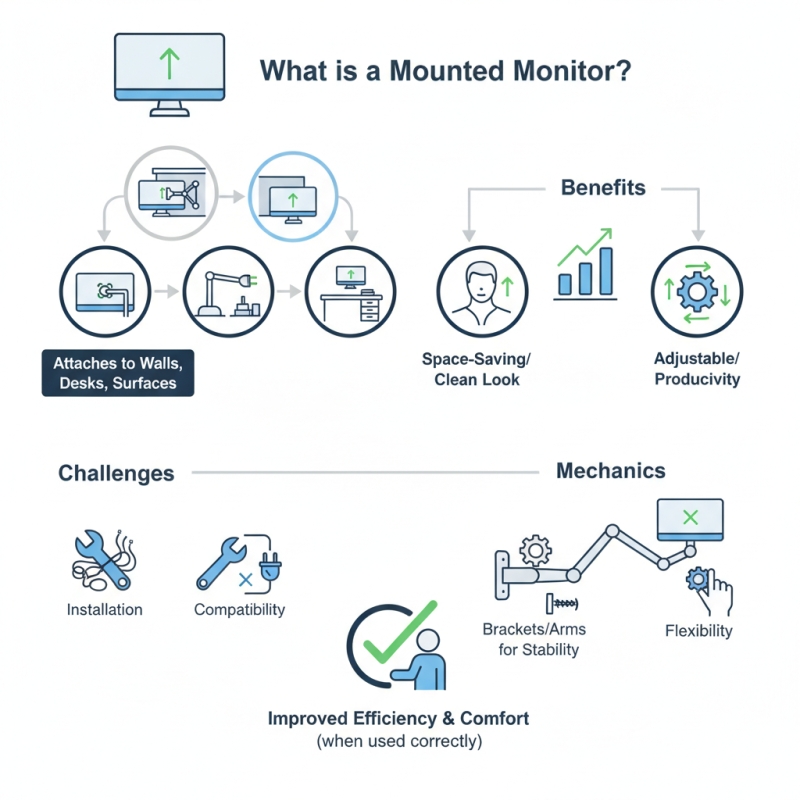
A Mounted Monitor is an innovative device that transforms how we interact with technology. It is designed to be attached to walls, desks, or other surfaces. This positioning offers an ergonomic advantage, saving space and enhancing productivity. With its adjustable features, users can customize the angle and height to fit their needs.
Consider the convenience of a Mounted Monitor in a busy workspace. It keeps the screen at eye level, reducing neck strain and promoting comfort. The clean look of a mounted display eliminates cable clutter. However, some might struggle with installation or compatibility issues.
Understanding the mechanics behind a Mounted Monitor is essential. It typically uses brackets or arms for stability and flexibility. Users may find it challenging to adjust settings at times. Overall, a Mounted Monitor can greatly improve work efficiency and comfort when correctly used.
What is a Mounted Monitor?
A mounted monitor is a display that is fixed to a wall, stand, or any surface. It serves various functions, primarily for visual presentations and workspace efficiency. These monitors come in various sizes and resolutions. Users often prefer them for their aesthetic appeal and space-saving design. Unlike traditional monitors, they offer a cleaner, modern look.
Many people find mounted monitors beneficial for multitasking. For example, in an office, having a monitor at eye level can reduce strain on the neck. However, adjusting the height and angle properly is crucial. If not, users may experience discomfort over time. This is a common oversight. Mounting requires careful planning to avoid issues later.
Installing a mounted monitor can be a challenge. It’s important to select the right wall and bracket. Missed measurements can lead to an unstable setup. Additionally, considering cable management is vital. A tangled mess can detract from the clean appearance you desire. Some people rush through this process and regret it later. Being mindful of these details can lead to a more effective and visually pleasing workspace.
Components of a Mounted Monitor System
Mounted monitors are essential in various environments. They consist of several key components that contribute to their functionality.
The display screen is the most visible part. It shows images and data. A sturdy mount system secures the monitor. This ensures stability and security in different settings.
Another vital component is the power supply. It provides the necessary energy for the monitor to operate. Without a reliable power source, it won't function. The data cables, like HDMI or VGA, connect the monitor to a computer or another device. These cables enable the transmission of video signals.
Finally, the user interface is crucial for interaction. Touchscreens have become popular in many mounted systems. They allow for easy navigation and control. However, not all interfaces are user-friendly. Some may frustrate users instead of helping them. Improving usability remains an area for development in mounted monitor systems.
How Mounted Monitors are Installed and Configured
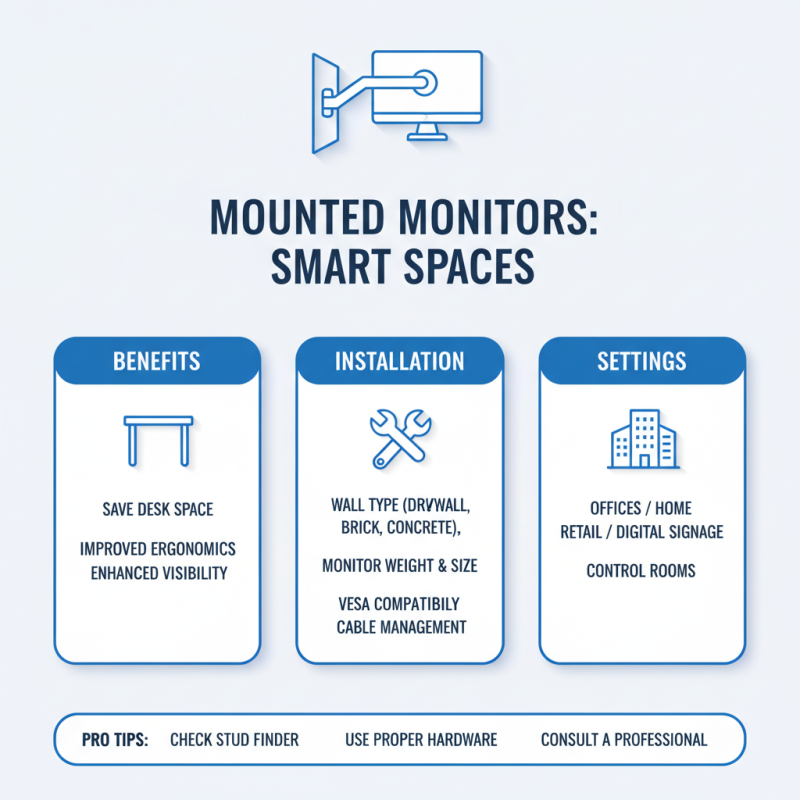
Mounted monitors are increasingly popular in various settings, from offices to retail spaces. These monitors save desk space and enhance visibility. Installing a mounted monitor may seem straightforward, but factors like wall type and monitor weight require careful consideration.
Before installation, assess the wall. A drywall may need additional support. Use a stud finder to locate wooden studs. Anchors are crucial for concrete or brick walls. Once you’ve selected the ideal location and secured the mounts, the configuration begins. Properly tilt and swivel the monitor for ergonomic comfort. Adjustments can influence user experience significantly. A report from the International Display Manufacturers Association suggests that proper monitor placement can enhance productivity by 20%.
Configuration also includes settings adjustments. Ensure brightness and contrast levels are optimal to reduce eye strain. According to studies, 70% of users who adjust these settings report improved comfort. Calibration tools, available in various formats, can assist in this process. Remember, the goal is to create a setup that is not only functional but also user-friendly. Frequent checks may be necessary, as monitor angles can shift over time. Re-evaluating setup is essential for ongoing effectiveness.
Functionality and Use Cases of Mounted Monitors
Mounted monitors have become essential in various settings, enhancing productivity and usability. In industrial environments, these displays are vital for real-time data monitoring. According to recent industry reports, the global market for mounted displays is expected to reach $30 billion by 2025, illustrating their growing significance.
In healthcare, mounted monitors help track patient vital signs. A study showed that staff efficiency can improve by 25% when using mounted screens, as information is easily accessible. Retail settings also benefit, using these monitors for advertising and customer engagement. A survey found that 70% of consumers respond better to visual displays, proving their effectiveness in attracting attention.
Tips: When choosing a mounted monitor, consider the viewing angle. It should fit ergonomically within your workspace. Ensure that the mount can hold the monitor securely. Durability is crucial, especially in high-traffic areas.
However, there are challenges. Not all mounted displays offer the same brightness or resolution, creating potential strain on users. Integrating touchscreen technology can complicate installations, especially in older buildings. It's important to assess the specific demands of your environment.
Ultimately, mounted monitors can transform working spaces. Careful selection and placement can significantly enhance functionality and user experience.
What is a Mounted Monitor and How Does it Work? - Functionality and Use Cases of Mounted Monitors
| Feature |
Description |
Use Cases |
| Display Type |
LCD/LED |
Office work, gaming, multimedia presentation |
| Resolution |
1920x1080 (Full HD) to 3840x2160 (4K) |
Graphic design, video editing |
| Mounting Options |
Wall-mounted, VESA mount, free-standing |
Retail displays, conference rooms |
| Connectivity |
HDMI, VGA, DisplayPort |
Connecting to PCs, laptops, and other devices |
| Touch Capability |
Optional touch screen feature |
Interactive kiosks, educational displays |
| Operating Environment |
Indoor and Outdoor (with appropriate casing) |
Advertising boards, public information displays |
Advantages and Limitations of Mounted Monitors
Mounted monitors are gaining popularity for their versatility in various settings. These displays can be attached to walls or desks, saving valuable space. One significant advantage is their ability to provide better ergonomics. Users can adjust the monitor's height and angle, reducing strain on the neck and eyes. The clean appearance also enhances workspace organization, making it visually appealing.
However, there are limitations to consider. Not all wall mounts are adjustable, which can restrict viewing angles. Fixed mounts may not suit everyone, depending on individual height and preferences. Installation can also be tricky. It requires precise measurements and wall reinforcements, which can lead to frustration. Plus, moving the monitor once it’s mounted isn't as simple as using a standard desk setup.
Despite these challenges, many find that the benefits outweigh the drawbacks. A well-mounted monitor can transform a workspace. This setup not only offers a modern look but also promotes better posture and productivity.
Advantages and Limitations of Mounted Monitors