When constructing a custom PC, one of the most critical aspects to consider is the cooling system, particularly for high-performance builds. As components work harder, they generate more heat, which can lead to thermal throttling or permanent damage if not managed properly. This is where effective watercooling parts come into play. Watercooling technology has gained immense popularity among PC enthusiasts due to its ability to efficiently dissipate heat while maintaining lower noise levels compared to traditional air cooling methods.
In this article, we will explore the top 10 essential watercooling parts needed for an optimal custom PC setup. Each component plays a vital role in creating a robust cooling loop that ensures your system runs at peak performance. Whether you are a seasoned builder or a newcomer to the world of watercooling, understanding these parts will empower you to make informed choices and create a reliable cooling solution tailored to your specific needs. From radiators and water blocks to pumps and reservoirs, we will guide you through the essentials to help you achieve a high-performing, aesthetically pleasing custom PC.
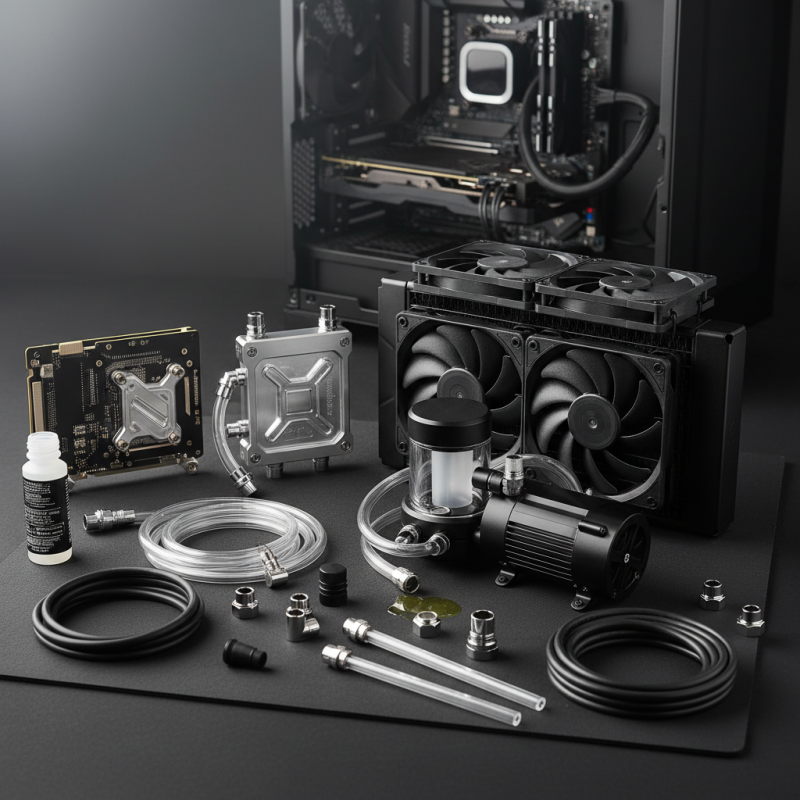
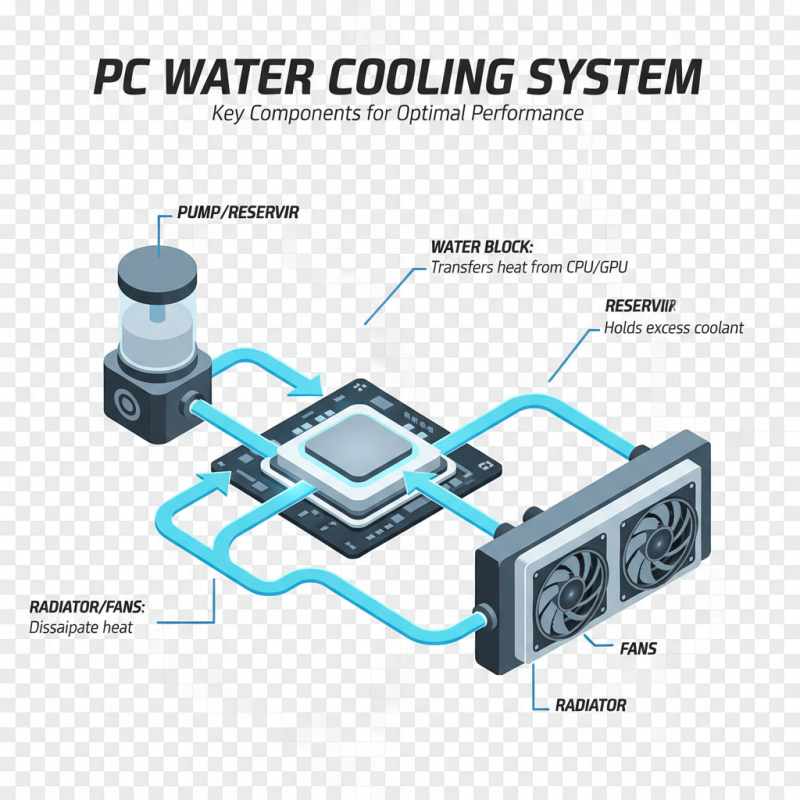
When building a custom PC, an efficient water cooling system is essential for maintaining optimal temperatures, especially for high-performance components. The core components of a water cooling setup include the water block, pump, reservoir, radiator, and fans. The water block is responsible for transferring heat away from the CPU or GPU, ensuring these vital parts remain cool under heavy loads. The pump circulates the coolant through the system, and a reliable pump is crucial for maintaining the flow rate and pressure needed for effective cooling.
The reservoir acts as a storage unit for the coolant, providing a necessary supply for the system and allowing for easy refilling and maintenance. The radiator, accompanied by fans, dissipates heat from the coolant into the air, completing the cooling cycle. The selection of these components is crucial, as each part must work harmoniously to achieve the desired cooling performance. Additionally, users may also consider including coolant tubing and fittings, which connect the various components, ensuring a leak-free and efficient system. By carefully selecting and assembling these essential parts, builders can create a water cooling system that offers superior thermal management and enhances the overall performance of their custom PC.
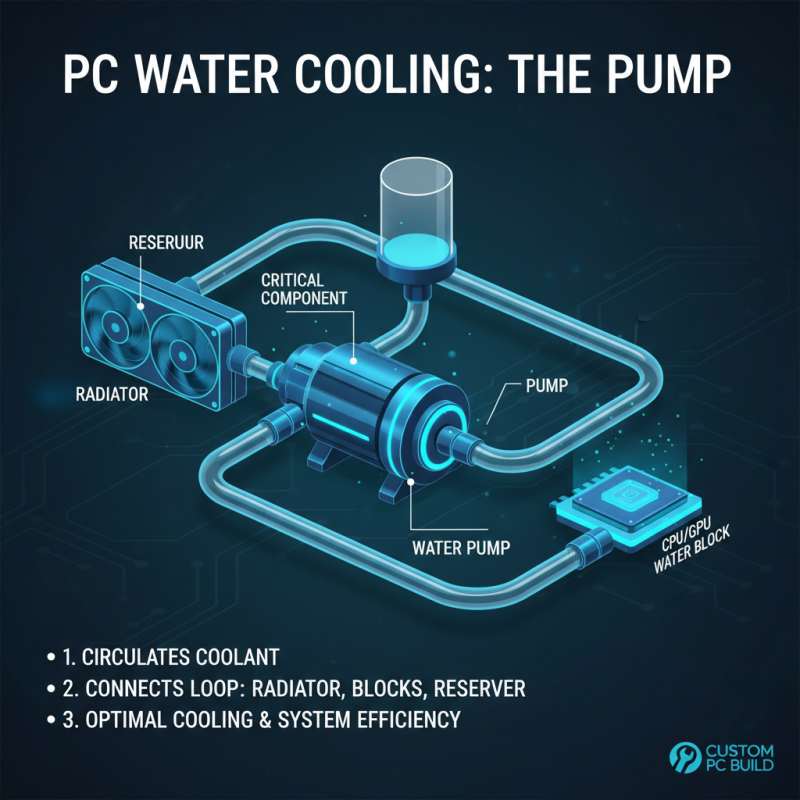
When it comes to water cooling systems for custom PC builds, one of the most critical components is the water pump. The pump is responsible for circulating coolant through the loop, connecting the radiator, water blocks, and reservoir. Selecting the right water pump is essential for achieving optimal cooling performance and ensuring the efficiency of the entire system.
When choosing a water pump, consider factors such as flow rate and head pressure. A higher flow rate allows for better coolant circulation and heat dissipation, which translates into cooler operating temperatures for your components. On the other hand, head pressure determines the pump's ability to push the coolant through the entire loop, especially if you have a complex setup with multiple water blocks and a large radiator. Additionally, ensure that the pump's design fits your build's aesthetics and space constraints, as pumps come in various sizes and styles to accommodate different configurations.
Moreover, noise levels should also be taken into account when selecting a water pump, as some models can create noticeable sounds during operation. Opting for a pump known for quiet performance can greatly enhance your overall experience, providing a peaceful computing environment. With these considerations in mind, you can select a water pump that not only meets your cooling performance expectations but also complements your custom PC build seamlessly.
When it comes to water cooling for a custom PC build, understanding the role of radiators is crucial. Radiators serve as the heart of the cooling system, dissipating heat absorbed from the CPU and GPU to maintain optimal performance. The size and efficiency of a radiator can significantly impact how effectively your system stays cool. A larger radiator with more surface area typically provides better cooling performance, allowing for lower fan speeds and quieter operation. However, it’s essential to balance size with your case compatibility to ensure a proper fit.
Tip: When selecting a radiator, consider the thickness as well as the size. Thicker radiators can offer better cooling capabilities due to more coolant volume and increased surface area, but you will need to ensure your case has enough space to accommodate the extra thickness without impeding airflow.
Efficiency also plays a significant role in the effectiveness of a radiator. Look for radiators with a high fin density, as this enables better heat dissipation. The material used in the radiator, such as copper or aluminum, can affect efficiency as well. Copper tends to conduct heat more effectively, while aluminum is lighter and less expensive.
Tip: When installing your water cooling system, ensure that the radiator is mounted properly to allow for optimal airflow. Positioning the radiator in a way that enhances airflow can significantly improve cooling performance and system stability.
When building a custom PC, selecting the best water blocks for CPU and GPU is a critical step to ensure optimal cooling performance and aesthetics. Water blocks are essential components that facilitate heat transfer away from the processors, which is crucial for maintaining stable temperatures during intense gaming sessions or demanding workloads. When choosing a water block, consider factors such as compatibility with your specific CPU and GPU models, the material used in the construction, and the overall design that matches your build.
Moreover, it's important to assess the cooling efficiency of the water blocks. Look for designs that offer a larger surface area for heat exchange and check the fin structure, as this can significantly affect performance. A well-designed water block can enhance fluid flow, leading to better thermal conductivity. Reviews and user experiences can provide insights into the effectiveness of different blocks, helping you make an informed decision. Selection not only enhances system performance but also contributes to the visual appeal of your setup, showcasing a clean and custom look that complements your overall style.
In the realm of custom PC builds, the importance of proper fittings and tubing cannot be overstated, especially when it comes to water cooling systems. According to a recent market report by ResearchAndMarkets, the global liquid cooling market is expected to grow significantly, projected to reach over $2 billion by 2025. This surge in popularity underscores a critical focus on ensuring that custom setups are not only efficient but also leak-free. Selecting the right fittings—whether compression, barb, or quick disconnect—plays a pivotal role in the integrity of your cooling system. High-quality fittings combined with durable tubing materials reduce the risk of leaks, which could otherwise lead to hardware damage and costly repairs.
Furthermore, the choice of tubing is equally significant. Materials such as PVC, silicone, and PETG each offer unique advantages in terms of flexibility and heat resistance that can enhance the overall performance of a water cooling system. A study from the Hardware Association noted that improper tubing selection is a leading cause of leaks in PC water cooling setups, highlighting the need for users to opt for reinforced and well-sealed options. Consequently, investing in quality components and taking care during the installation process can mitigate potential issues, ensuring optimal thermal performance and system longevity.